Transport Security Model
Vitess exposes a few RPC services and internally uses RPCs. These RPCs can optionally utilize secure transport options to use TLS over the gRPC HTTP/2 transport protocol. This document explains how to use these features. Finally, we briefly cover how to secure the MySQL protocol transport to VTGate.
Overview #
The following diagram represents all the RPCs we use in a Vitess cluster via gRPC:
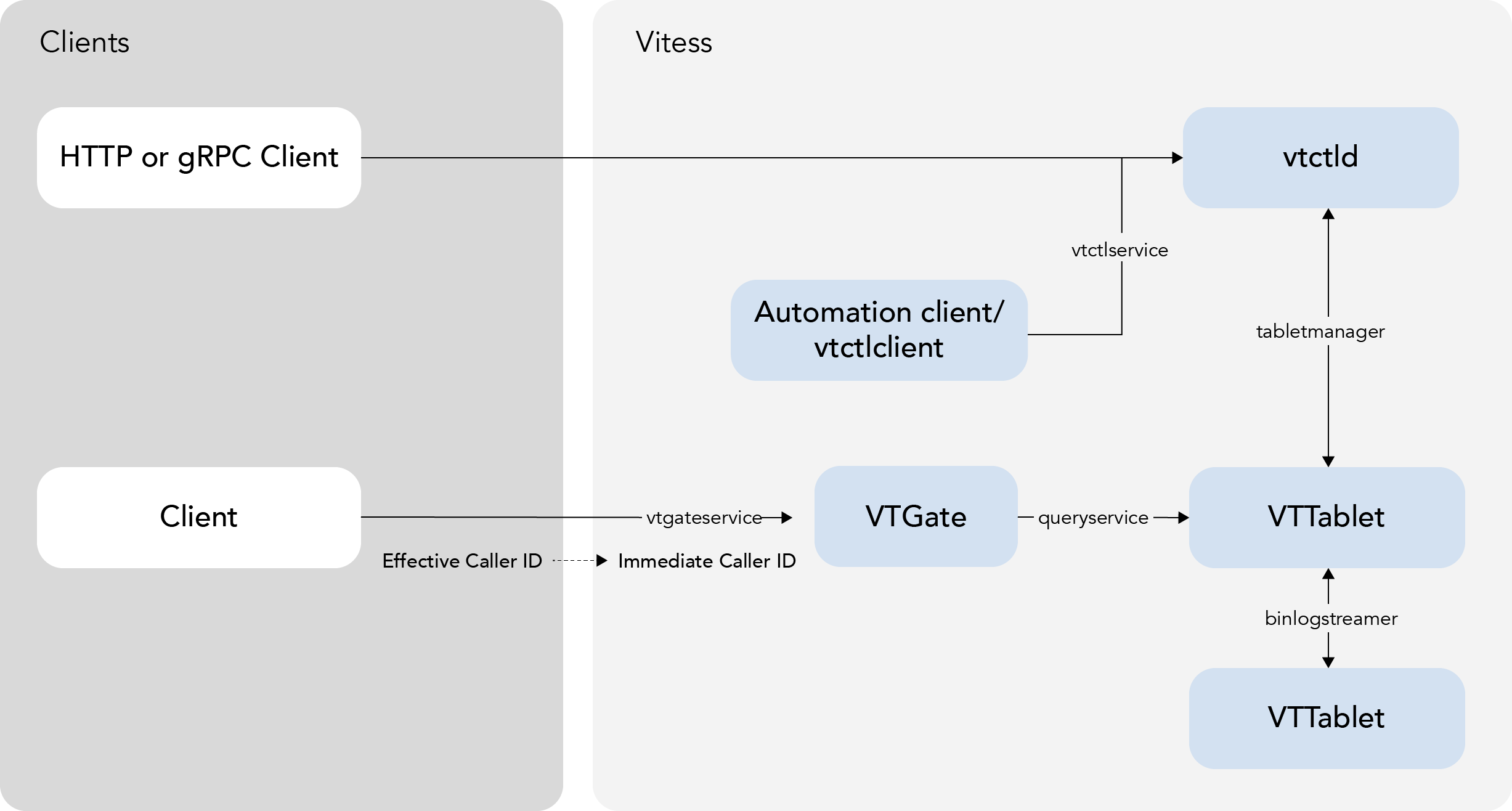
There are two main categories:
- Internal RPCs: They are used to connect Vitess components.
- Externally visible RPCs: They are used by the app to talk to Vitess. Note that it is not necessary to use this gRPC interface. It is still possible to instead use the MySQL protocol to VTGate, which is not covered in this document.
A few features in the Vitess ecosystem depend on authentication including Caller ID and table ACLs.
Caller ID #
Caller ID is a feature provided by the Vitess stack to identify the source of queries. There are two different Caller IDs:
- Immediate Caller ID: It represents the secure client identity when it enters the Vitess side:
- It is a single string representing the user connecting to Vitess (VTGate).
- It is authenticated by the transport layer used.
- It can be used by the Vitess TableACL feature.
- Effective Caller ID: It provides detailed information on the individual caller process:
- It contains more information about the caller: principal, component, and sub-component.
- It is provided by the application layer.
- It is not authenticated.
- It is exposed in query logs. Enabling it can be useful for debugging issues like the source of a slow query.
gRPC Transport #
gRPC Encrypted Transport #
When using gRPC transport, Vitess can use the usual TLS security features. Please note that familiarity with TLS is necessary here:
- Any Vitess server can be configured to use TLS with the following command line parameters:
--grpc-cert,--grpc-key: server cert and key to use.--grpc-ca(optional): client cert chains to trust. If specified, the client must then use a certificate signed by one of the CA certs in the provided file.
- A Vitess go client can be configured with symmetrical parameters to enable
TLS:
--[vtgate|tablet]_grpc_ca: list of server cert signers to trust. I.E. the client will only connect to servers presenting a cert signed by one of the CAs in this file.--[vtgate|tablet]_grpc_server_name: common name of the server cert to trust. Instead of the hostname used to connect or IP SAN if using an IP to connect.--[vtgate|tablet]_grpc_cert,--[vtgate|tablet]_grpc_key: client side cert and key to use in cases when the server requires client authentication.
- Other clients can take similar parameters, in various ways. Please view each client's parameters for more information.
With these options, it is possible to use TLS-secured connections for all parts of the gRPC system. This enables the server side to authenticate the client, and/or the client to authenticate the server.
This is not enabled by default, as usually the different Vitess servers will run on a private network. It is also important to note, that in a Cloud environment, for example, usually all local traffic is already secured between VMs.
Options for vtctld #
| Name | Type | Definition |
|---|---|---|
| --tablet-grpc-ca | string | the server ca to use to validate servers when connecting |
| --tablet-grpc-cert | string | the cert to use to connect |
| --tablet-grpc-key | string | the key to use to connect |
| --tablet-grpc-server-name | string | the server name to use to validate server certificate |
| --tablet-manager-grpc-ca | string | the server ca to use to validate servers when connecting |
| --tablet-manager-grpc-cert | string | the cert to use to connect |
| --tablet-manager-grpc-key | string | the key to use to connect |
| --tablet-manager-grpc-server-name | string | the server name to use to validate server certificate |
| --throttler-client-grpc-ca | string | the server ca to use to validate servers when connecting |
| --throttler-client-grpc-cert | string | the cert to use to connect |
| --throttler-client-grpc-key | string | the key to use to connect |
| --throttler-client-grpc-server-name | string | the server name to use to validate server certificate |
| --vtgate-grpc-ca | string | the server ca to use to validate servers when connecting |
| --vtgate-grpc-cert | string | the cert to use to connect |
| --vtgate-grpc-key | string | the key to use to connect |
| --vtgate-grpc-server-name | string | the server name to use to validate server certificate |
Options for vtgate #
| Name | Type | Definition |
|---|---|---|
| --tablet-grpc-ca | string | the server ca to use to validate servers when connecting |
| --tablet-grpc-cert | string | the cert to use to connect |
| --tablet-grpc-key | string | the key to use to connect |
| --tablet-grpc-server-name | string | the server name to use to validate server certificate |
Options for vttablet #
| Name | Type | Definition |
|---|---|---|
| --binlog-player-grpc-ca | string | the server ca to use to validate servers when connecting |
| --binlog-player-grpc-cert | string | the cert to use to connect |
| --binlog-player-grpc-key | string | the key to use to connect |
| --binlog-player-grpc-server-name | string | the server name to use to validate server certificate |
| --tablet-grpc-ca | string | the server ca to use to validate servers when connecting |
| --tablet-grpc-cert | string | the cert to use to connect |
| --tablet-grpc-key | string | the key to use to connect |
| --tablet-grpc-server-name | string | the server name to use to validate server certificate |
| --tablet-manager-grpc-ca | string | the server ca to use to validate servers when connecting |
| --tablet-manager-grpc-cert | string | the cert to use to connect |
| --tablet-manager-grpc-key | string | the key to use to connect |
| --tablet-manager-grpc-server-name | string | the server name to use to validate server certificate |
Certificates and Caller ID #
Additionally, if a client uses a certificate to connect to Vitess (VTGate) via gRPC, the common name of that certificate is passed to vttablet as the Immediate Caller ID. It can then be used by table ACLs to grant read, write or admin access to individual tables. This should be used if different clients should have different access to Vitess tables.
Static Authentication #
In addition to TLS client certificates, the gRPC server can authenticate clients using static username/password credentials. To enable this, set --grpc-auth-mode=static and point --grpc-auth-static-password-file at a JSON file listing the authorized users. A client then presents its username and password to the gRPC server, which validates them against the entries in that file. Note that this static gRPC auth plugin is distinct from the static authentication used for the MySQL protocol to VTGate; the two use separate credentials files and formats.
The credentials file is a JSON array of entries. Each entry contains a Username and either a plaintext Password or a hex-encoded CachingSha2Password hash. A single file can mix plaintext and hashed entries:
[
  {
    "Username": "user1",
    "Password": "plaintext_password"
  },
  {
    "Username": "user2",
    "CachingSha2Password": "*49bbd275dd4bfb1170ced93e839a8ec1d5b86eab6acb0842502130a31702390d"
  }
]
Storing plaintext passwords on disk is discouraged outside of test environments. Instead, set CachingSha2Password to the hex-encoded SHA256(SHA256(password)) of the user's password, with an optional leading *. This is the same format as the CachingSha2Password field used by the MySQL protocol's static auth server, so a single stored credential value can authenticate a user on both the MySQL and gRPC endpoints, and hashes that operators already manage for caching_sha2_password can be copied verbatim. The hash value is case-insensitive, and the leading * is optional.
You can generate a CachingSha2Password hash by applying SHA256 to the cleartext password string twice, for example in MySQL for the cleartext password password:
mysql> SELECT UPPER(SHA256(UNHEX(SHA256("password")))) as hash;
+------------------------------------------------------------------+
| hash                                                             |
+------------------------------------------------------------------+
| 73641C99F7719F57D8F4BEB11A303AFCD190243A51CED8782CA6D3DBE014D146 |
+------------------------------------------------------------------+
1 row in set (0.01 sec)
When an entry sets both Password and CachingSha2Password, the hash takes precedence and the plaintext Password is ignored. Hashes are validated when VTGate starts, so an invalid hex string or a value that is not a valid SHA256 digest causes startup to fail.
When the static auth plugin is in use, the grpc-use-static-authentication-callerid flag copies the authenticated username into the Immediate Caller ID, which can then drive table ACLs as described above.
Caller ID Override #
In a private network, where TLS security is not required, it might still be desirable to use table ACLs as a safety mechanism to prevent a user from accessing sensitive data. The gRPC connector provides the grpc_use_effective_callerid flag for this purpose: if specified when running vtgate, the Effective Caller ID's principal is copied into the Immediate Caller ID, and then used throughout the Vitess stack.
Important: This is not secure. Any user code can provide any value for the Effective Caller ID's principal, and therefore access any data. This is intended as a safety feature to make sure some applications do not misbehave. Therefore, this flag is not enabled by default.
Another way to customize the immediateCallerID is to set the grpc-use-static-authentication-callerid flag on vtgate, which is only effective if you're using the static authentication plugin with vtgate. In this case, the username from the current authenticated session to vtgate is copied over as the Immediate Caller ID, and used throughout the Vitess stack.
Example #
For a concrete example, see encrypted_transport_test.go in the source tree.
It first sets up all the certificates, some table ACLs, and then uses the golang client to connect with TLS. It also exercises the grpc_use_effective_callerid flag, by connecting without TLS.
MySQL Transport to VTGate #
To get VTGate to support TLS use the --mysql-server-ssl-cert and --mysql-server-ssl-key VTGate options. To require client certificates, you can set --mysql-server-ssl-ca, containing the CA certificate you expect the client TLS certificates to be verified against.
Finally, if you want to require all VTGate clients to only be able to connect using TLS, you can use the --mysql-server-require-secure-transport flag.
Certificate Revocation Lists (CRLs) #
Vitess uses a configured certificate revocation list (CRL) to reject certificates that an operator has revoked before they expire. A CRL is a signed list of certificates that their issuer has invalidated ahead of their scheduled expiry. When Vitess loads one, Vitess refuses any TLS connection whose certificate chain contains a revoked certificate. This section covers configuring Vitess to enforce a CRL, not generating, distributing, or rotating the CRL itself, and it assumes familiarity with the TLS and CA/certificate-chain concepts covered earlier on this page. With a CRL in place, a certificate you revoke stops being accepted, on new and resumed connections alike.
CRL Flags #
You configure a CRL by pointing the *-crl flag for the component and transport you are securing at a CRL file: --grpc-crl, --mysql-server-ssl-crl, --vtgate-grpc-crl, --tablet-grpc-crl, --vtctld-grpc-crl, --tablet-manager-grpc-crl, and --binlog-player-grpc-crl. Each is paired with the corresponding -ca flag — for example, --grpc-crl with --grpc-ca, and --vtgate-grpc-crl with --vtgate-grpc-ca — which supplies the CA that the revocation check builds and validates chains against.
Enforcement Scope #
A configured CRL is checked on every connection: in every SSL mode (preferred, required, verify_ca, and verify_identity), on resumed TLS sessions, and on both the client and server sides.
The subsections below describe this enforcement in each SSL mode, the checks Vitess runs when it loads a CRL at startup, and how it treats verified chains during a CA rollover.
Behavior by SSL Mode #
In preferred, required, and verify_ca modes, Go's built-in TLS verification is disabled and Vitess builds the certificate chain manually inside the revocation checker — to the configured CA, or to the system roots when no CA is configured — and rejects the connection when that chain cannot be built or verified. A configured CRL rejects each of these connections. Each entry below pairs the rejection with the fix that restores it:
requiredwith a CRL but no CA, against a privately issued server certificate — configure the CA the server's chain leads to.- A CRL and a root CA, against a server that omits its intermediate certificate — have the server present its whole chain.
- A CRL against a server certificate that has expired or is not valid for server authentication — re-issue the server certificate.
In verify_identity mode, Go's own TLS verification stays in effect: it builds and verifies the chain and validates the server's hostname against the certificate, and the CRL check then runs on that already-verified chain.
Startup Validation #
Vitess refuses a CRL at startup when it cannot apply the file as a complete list validated by its issuer. The conditions are:
- a bad signature;
- an issuer CA that lacks the
cRLSignkey usage (the X.509 extension marking a CA authorized to sign CRLs); - an issuer that is mismatched or differently encoded from the issuer named on the certificates;
- an unsupported signature algorithm;
- a delta, indirect, or scope-limited CRL;
- a file that contains no X.509 CRL block;
- a server CRL configured without a CA;
- a CRL dated more than 5 minutes in the future;
- unsupported critical extensions.
Re-issue the CRL so that its issuer, encoding, authority key identifier, cRLSign usage, and signature algorithm are valid and its date is no more than 5 minutes ahead of the current time.
gRPC Clients #
A gRPC client configured with a CRL but with neither a client certificate nor a CA connects with TLS, verifying the server against the system roots.
Verified Chains and CA Rollover #
A peer passes the check when any one verified chain holds no revoked certificate. Within a chain, every certificate except the trust anchor is looked up in the CRLs signed by its issuer, which is the next certificate in the chain. During a CA rollover, a cross-signed intermediate that one root has revoked still passes through the other root. A trust anchor is trusted as configured. Because its own issuer is not part of the peer's chain, Vitess checks it against a CRL only when its issuing certificate is also present in the configured CA file. If that issuer's CRL lists the anchor as revoked, the anchor is rejected for every connection that would end at it — even when the anchor has more than one configured issuer, unlike an interior certificate of a chain, which can still pass through a different, non-revoking issuer.
preferred, required, and verify_ca modes, nor on resumed sessions, so connections that succeeded before may now fail closed. Check whether any component is started with a *-crl flag before assuming this does not affect you. To keep a formerly working connection alive, configure the CA that the server's chain leads to, have the server present its whole valid chain, or drop the CRL. For a gRPC client, configure the CA alongside the CRL or drop the CRL. Re-issue any CRL that is invalid or dated more than 5 minutes in the future.